AI-assisted report drafting for UK fire risk assessors
Spend less time writing fire risk assessment reports.
Speak or type your findings on site and add photos. FRAwrite drafts the report in your own template and shows the notes behind each drafted finding. You check it, change anything, then export to Word or PDF.
First report and template setup free · No card · Then £10 per report, no subscription
Leave your email and we’ll reply within two hours during the working day to arrange setup before your first report. Want to see the output first? See the example report.
01 Your site note
Two folded removal cartons and a child's scooter sat against the stair newel in the entrance lobby. The clear width past them was about one shoulder, and they were still there twenty minutes later.
02 The AI draft For your review
In the ground-floor entrance lobby, two folded removal cartons and a child's scooter were against the stair newel, leaving a clear width of about one shoulder.
You check the wording. Edit the draft against your notes before issuing the report.
See the check in the demoCopied word for word from the demo video.
- Your template, set up for youWe build it from your current report format, including checklist layouts and photo appendices, at no charge
- Findings shown beside your notesCheck each drafted finding against what you recorded
- Word, PDF and action planFiles you keep and can edit
From site notes to a draft you check
Watch the demo (2 min)See an answer beside its notes, the controls for accepting or changing suggested wording, and a draft PDF export.
Recorded from FRAwrite using a fictional demonstration job. Includes British narration and captions on screen.
Read the demo as text, with what is on screen
Writing up a fire risk assessment takes time. We help turn your site notes into a first draft, in the report template you already use.
You can start on your phone while you’re on site. Speak your notes, type them, or add a photo. Here, we’re typing a quick observation about access to the roof space. [On screen: The Site notes tab with Take photo, Record voice and Save note buttons, followed by the phone camera taking a photograph, then a return to Site notes.]
The hatch is padlocked, and there’s no ladder, so the space above hasn’t been inspected. Just record what you found, in your own words. [On screen: The note typed in full: “Roof hatch in the ceiling, padlocked. No ladder on site so I've left it shut. Not been above it.”]
Add the photo to keep it alongside your note, then save everything and pick up where you left off at your desk. [On screen: A photo attached to the note, then the saved note in the list. An on-screen note explains: “Draft questions on your phone or desktop”.]
When you’re ready, choose “Draft the empty questions”. FRAwrite uses your notes to start filling in the answers in your template. [On screen: The on-screen note says “Draft questions on your phone or desktop”. The desktop example shows the Write-up controls, then “Done · 5 answers updated · 13 questions had no relevant evidence · 11 left as they were”.]
Here’s an answer about the escape route, with the notes it came from right beside it. One describes the lobby; the other, the landing. You can check the wording without searching through your records. [On screen: The question “Are escape routes free from obstruction and of adequate width?” answered No, with Note 1 (ground-floor entrance lobby) and Note 2 (second-floor landing) shown beside the drafted answer.]
In this example, a resident mentioned paint tins in a store. But the door was locked, so the assessor couldn’t check inside. The draft keeps that distinction clear: reported, but not verified. [On screen: The answer marked “Not inspected — no access”, with the flags Confirm this, Reported, not verified and Partly covered.]
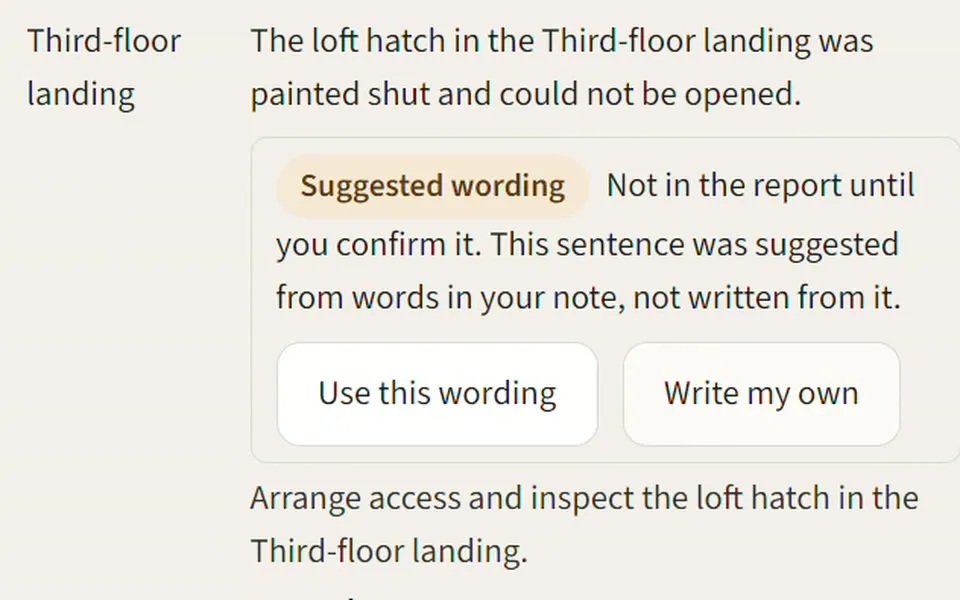
Next, review the suggested actions. This wording matches the access note, so we can accept it. [On screen: Action A06, bin store: a suggested sentence labelled “Not in the report until you confirm it”, with Use this wording and Write my own.]
This suggestion needs a change. It says the hatch was painted shut, but the note says it was padlocked. Choose “Write my own” and put that right. [On screen: Action A12: the suggestion reads “painted shut and could not be opened”; Write my own opens the edit form.]
And here, the door closer had already been replaced. We’ll leave this suggestion unaccepted, so it stays out of the report. [On screen: Action A11, ground-floor stair door: “The fire-door self-closer was missing”, left unaccepted.]
Before exporting, record anything the visit didn’t cover. In this case, no flats were entered, and the roof hatch wasn’t opened. [On screen: The Limitations field: “No flat was entered. The roof hatch was not opened.”]
You can then export a PDF, a Word document, or the action list. Here’s the draft PDF, ready for your final review. [On screen: Download PDF, Download Word and Download action list, with the note “Draft exports stay marked as draft until you approve a version”, then the PDF cover marked DRAFT.]
Less time writing, with your notes close at hand and you in control of the finished report.
Inspect the output
A report you can make your own
The report needs to look right when it leaves your desk. Open a complete FRAwrite example and inspect the layout, assessment sections, photographs and action plan.
Fictional Marsden Court example, with edited demonstration content in FRAwrite’s report format. It is not an issued assessment. Select a page to enlarge it.
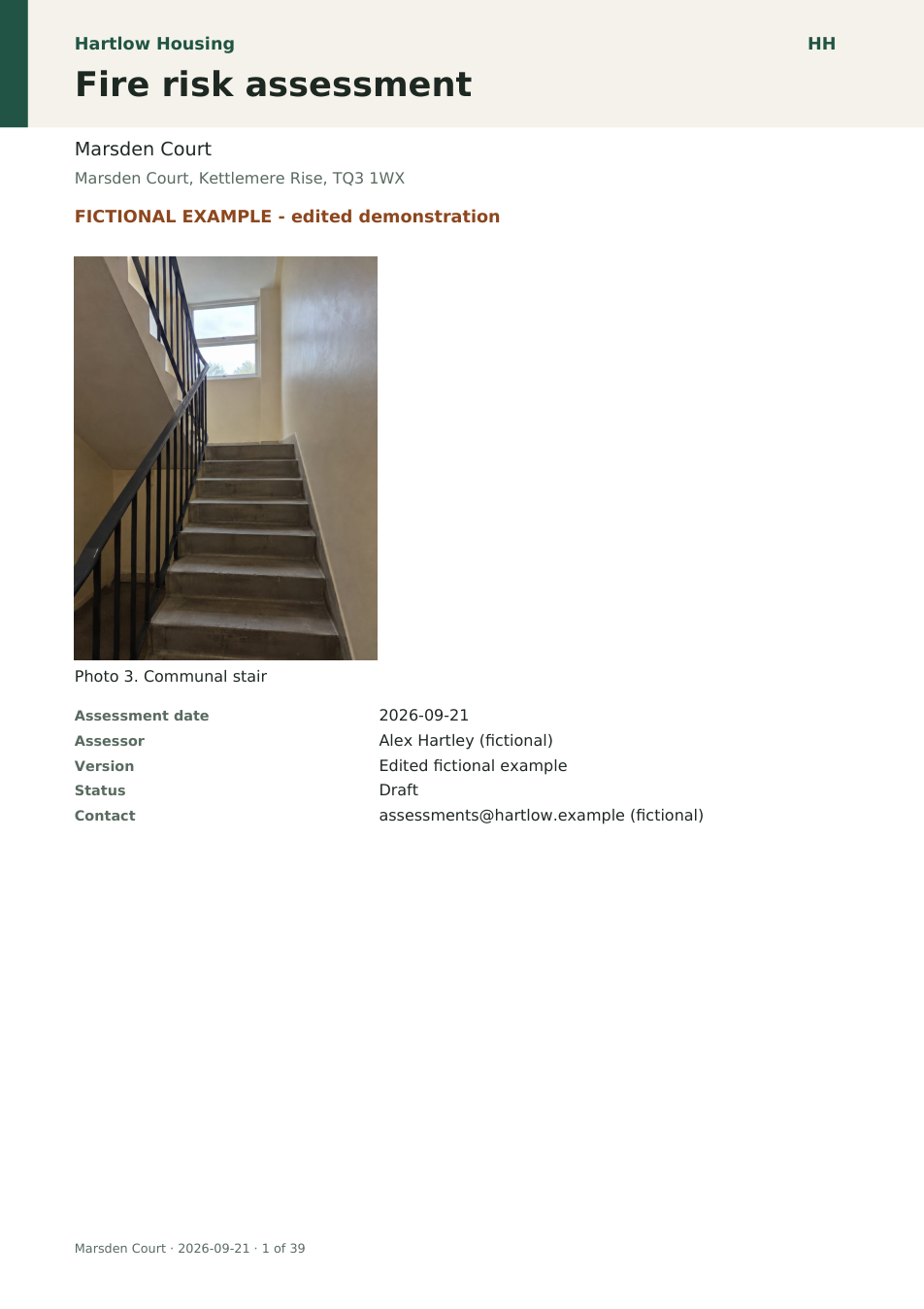
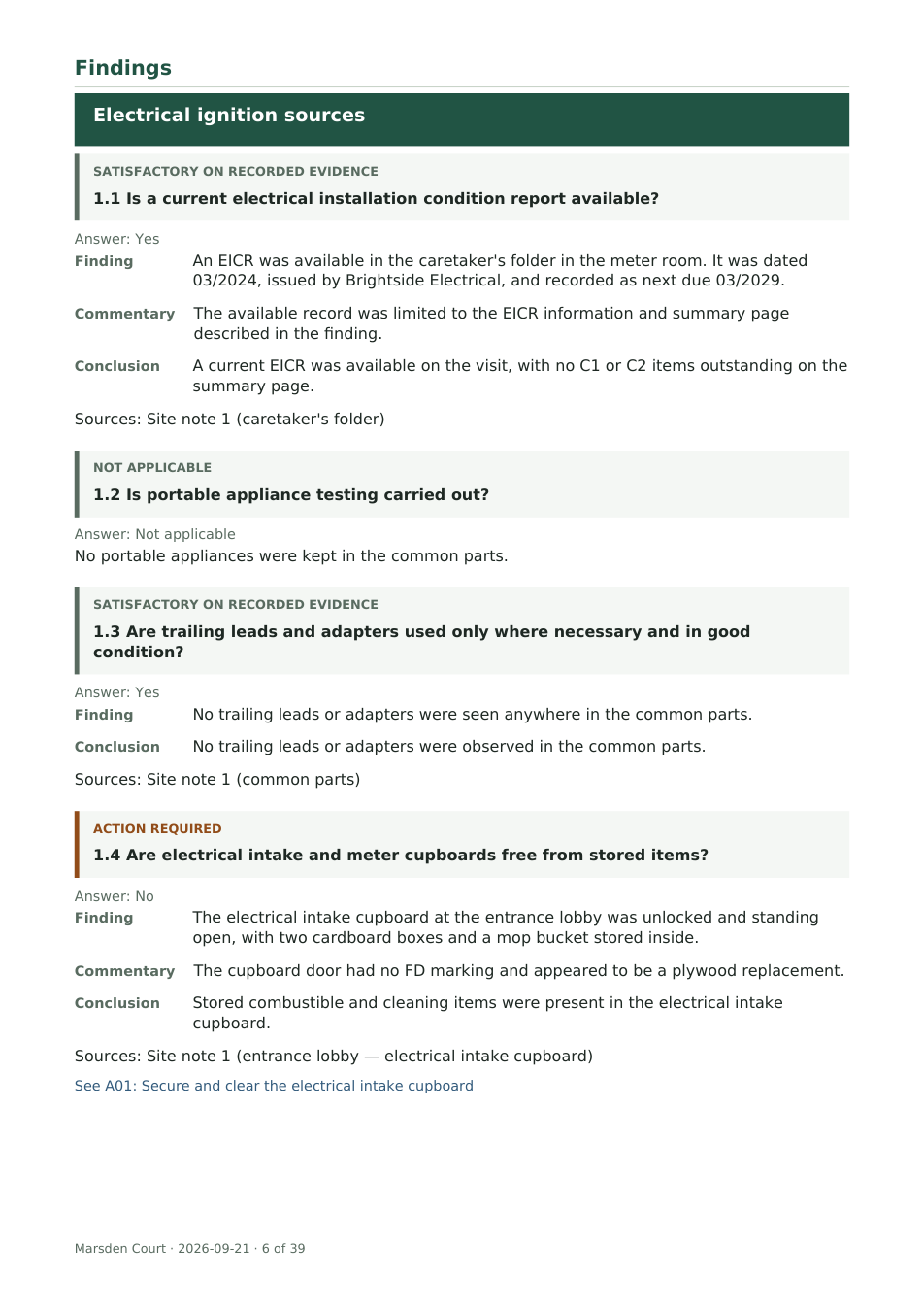
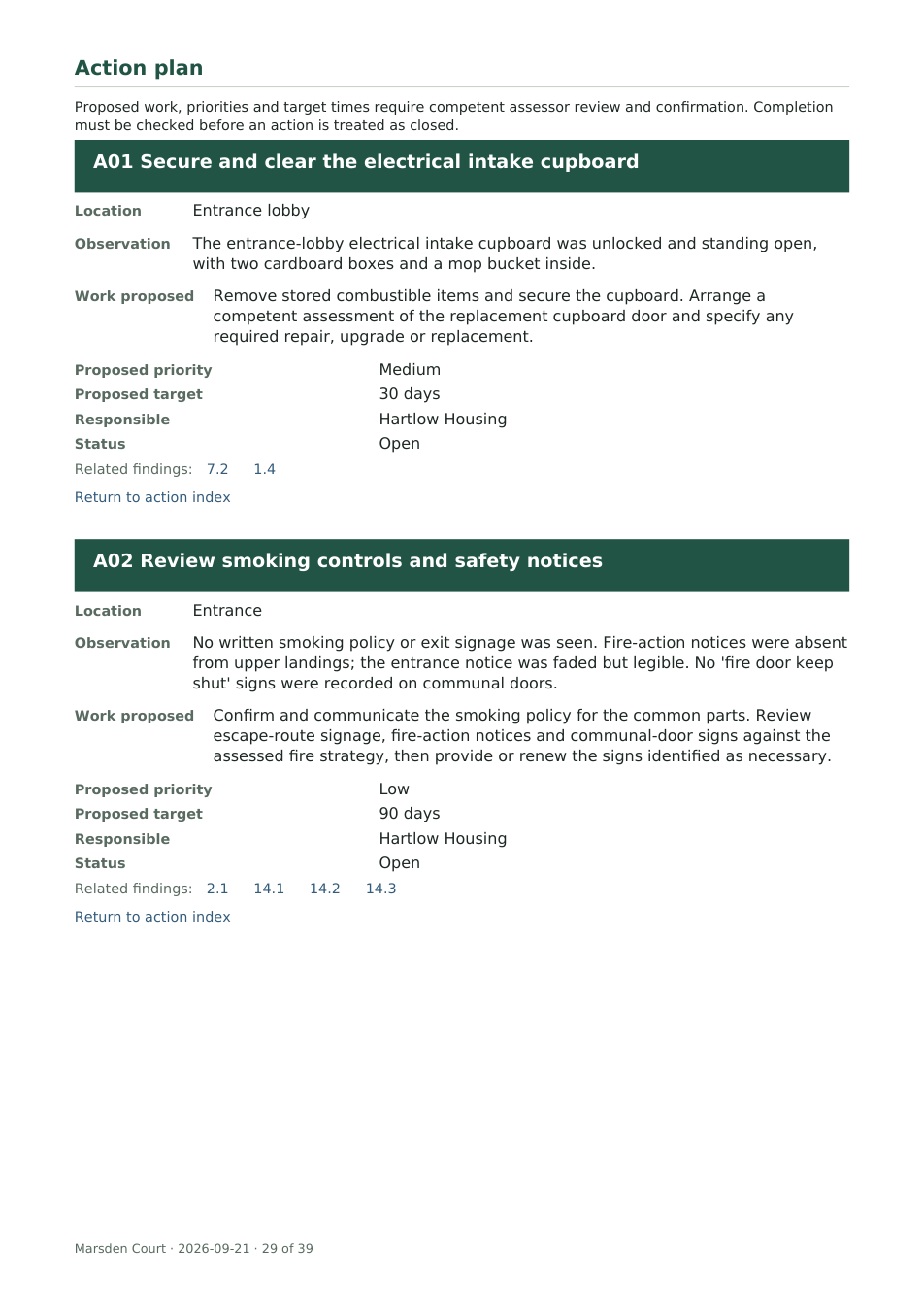
Want your own reports in this format? We’ll set up your template and help with your first report, free.
Arrange your free first reportBuilt around your work
How you check the draft
-
The notes behind each finding
The draft shows the site notes behind each drafted finding, so you can check the wording against what you recorded before it goes in the report.
-
Flags for what you couldn’t check
Anything only reported to you is marked Reported, not verified. Areas you couldn’t reach are marked Not inspected, for you to confirm.
-
Suggested actions need your OK
Suggested wording stays out of the report until you accept it. Choose Use this wording, write your own, or leave it out.
-
Finish in Word if you like
Edit every line in FRAwrite, or export to Word and carry on there. Exports stay marked as a draft until you approve a version, then generate the PDF.
£10 a report, only when you write one.
£10 per report after your free first one
Your first report is free. After that, £10 for each new assessment: one assessment of one premises. Editing and re-exporting the same report costs nothing extra.
- Template setup, free
- Edits and repeat exports of the same report
- Word and PDF report with your action plan, plus the actions as a CSV you can open in Excel
No subscription. No minimum number of reports. A month with no reports costs nothing.
Personal setup, included
Software that fits the way you work
We work with you one to one to get FRAwrite right for your business, from your report template to the way you write, review and deliver each assessment.
Tell us what you need. We’ll set up your template, work through your first report with you and fine-tune the details together.
Frequently asked questions
What if the AI gets something wrong?
It sometimes will. Each drafted answer sits beside the notes it came from, and the report lists those sources. Anything only reported to you is marked Reported, not verified. Suggested actions stay out of the report until you accept them, and exports stay marked as a draft until you approve a version. Your name goes on the report, so the final wording, risk rating and priorities are yours.
What happens after I ask for my free first report?
We’ll reply by email from [email protected] within two hours during the working day to arrange your template setup and your first report. There’s no card payment and nothing to upload to get started.
Can I keep my existing template?
Yes. We set up your report structure, questions, standard wording and branding from your template, so you don’t configure FRAwrite yourself.
I already use RiskBase, Aurora or Word. Where does FRAwrite fit?
FRAwrite produces the complete report in your own format, including checklist-style layouts with tick-and-cross answers, action fields such as severity, timescale and due date, and a numbered photo appendix. You can write your reports in FRAwrite while keeping the format your clients already know.
Does FRAwrite follow PAS 79 or BS 9792?
It follows your template. If your report is laid out to PAS 79-1, BS 9792:2025 or LACoRS guidance, that is the structure we set up. FRAwrite does not supply the standards’ own text, which stays under your licence.
How much time will it save me?
Try it on one of your own reports and compare the write-up time. FRAwrite gives you a first draft to check and edit, with the notes alongside it. Your first report is free, so you can see how it fits your workflow before paying anything.
What do I need to send, and how is client information handled?
Nothing now. For template setup we’ll ask for your report template, and ideally a past report with client details removed. Your notes are drafted by OpenAI’s API, which does not use them to train its models and removes them after 30 days; only the two founders can open your files, and we give you a written data processing agreement before any live job. Read where your client information goes.
Do I have to use voice notes?
No. You can speak, type or take photos, choosing whichever suits the visit.
Can I edit the report in Word?
Yes. FRAwrite exports to Word as well as PDF, plus an action plan you can open in Excel (CSV).
When do I start paying?
Template setup and your first report are free. If you choose to continue, each further assessment costs £10, including edits and repeat exports of the same report. There is no subscription.
What if I stop using FRAwrite?
Every report is exported as ordinary Word and PDF files that are yours to keep, and your template stays yours. There is no subscription to cancel.
Can someone else review the report?
Yes. An assigned reviewer can comment on a saved report version and approve it. Saved versions and review history stay with the assessment, which suits firms that check every assessment before it is issued.
Your free first report, set up for you
Try FRAwrite with your own report format. We handle the template setup and help you through your first report.
Your free first report
Leave your email address. We’ll reply within two hours during the working day to arrange your template setup and your first report.
Nothing to upload now. Later we’ll ask for your report template, and ideally a past report with client details removed.
Thanks, we’ve got your request
We’ll email you within two hours during the working day.
We’ll reply to .
Check your junk folder if you can’t see our reply. Nothing by the next working day? Email [email protected].
While you wait: open the example report or watch the demo.
Template setup and your first report are free. No card required. If you carry on, it’s £10 per report with no subscription.
Prefer to email? [email protected]
- Step 1
Leave your details
We’ll reply within two hours during the working day to arrange your free first report.
- Step 2
We set up your template
We’ll ask for your template, and ideally a recent report with client details removed, in Word or PDF. We prepare your report structure, questions, wording and branding from those files.
- Step 3
Try your first report with our help
Use it on your next job, or do a dry run on the notes from an old one first. We help you create the draft, check it against your notes and export the document.